Posted by admin on Aug 1, 2008 in
programming
Making some good progress today!!! I have added the ability to create lines for the script, delete lines, move lines up and down, record audio, and the like. Here are some screenshots:
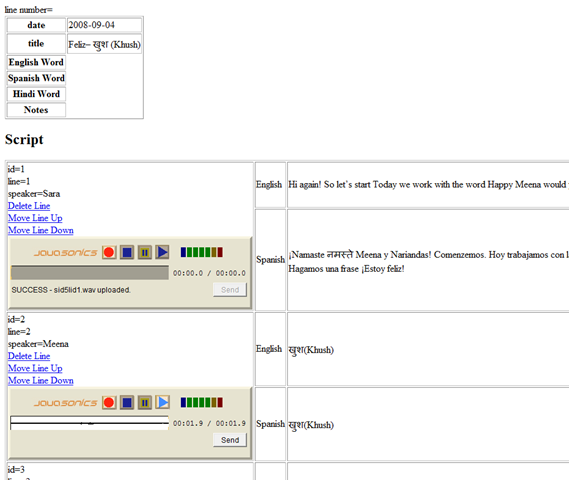
The JavaSonic ListenUP applet records things as a .wav. I will need to join these together. I found a function to do this:
http://www.splitbrain.org/blog/2006-11/15-joining_wavs_with_php
function joinwavs($wavs){
$fields = join('/',array( 'H8ChunkID', 'VChunkSize', 'H8Format',
'H8Subchunk1ID', 'VSubchunk1Size',
'vAudioFormat', 'vNumChannels', 'VSampleRate',
'VByteRate', 'vBlockAlign', 'vBitsPerSample' ));
$data = '';
foreach($wavs as $wav){
$fp = fopen($wav,'rb');
$header = fread($fp,36);
$info = unpack($fields,$header);
// read optional extra stuff
if($info['Subchunk1Size'] > 16){
$header .= fread($fp,($info['Subchunk1Size']-16));
}
// read SubChunk2ID
$header .= fread($fp,4);
// read Subchunk2Size
$size = unpack('vsize',fread($fp, 4));
$size = $size['size'];
// read data
$data .= fread($fp,$size);
}
return $header.pack('V',strlen($data)).$data;
}
It streams it out to the client.. .I will want to save it to the filesystem and use LAME to convert it into MP3.
This is the next step… After I am able to join them and convert them, then I will be at the point that I will have all the technical know how to do what I’m trying to do. Then it will be a matter of cleaning up the design, (in fact redesign (ok.. ok… not much of design now… just to design it)), make it look pretty, test test test… (I’m going to try to put the 15 scripts we have done so far for HabloHindu in there and see how that works), I need to add some authentication/security to it, then I will upload it and have Sara give it a try to see what she thinks…
Posted by admin on Aug 1, 2008 in
programming
I do not know PHP, but it seems very similar to lots of other web scripting languages I have used (NeoScript, ASP, etc.). With the help of a book, the web, and my past experience, I was able to put the following together in a few hours:
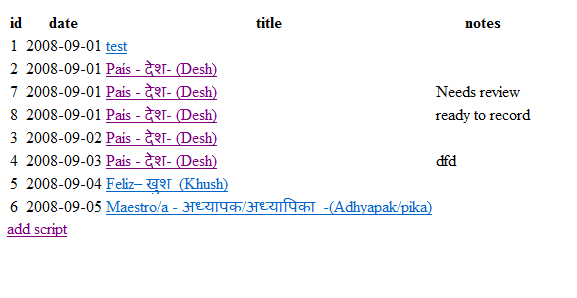
List of scripts page:
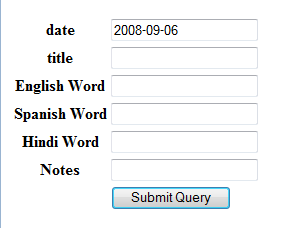
“Add script” takes you to this page:
The date is pre-populated as the “max date” + 1 day.
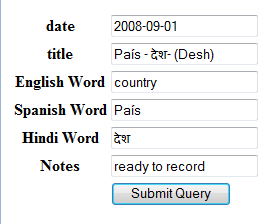
If you clicked on a script title on the first page, then you would be taken to a view that let you change the script:
The code behind all this is not good. But I just wanted to get through the basics… Let me put it here for reference:
I called the list page add.php (long story…)
I called the add/edit page addScript.php.
add.php code:
—
<?php
mysql_connect(“localhost”, “nobody”, “not_telling”);
mysql_select_db(“scriptEditor_dev”);
$query = “select id, date, title, notes from script order by date;”;
$results = mysql_query($query)
?>
<table>
<tr>
<th>id</th>
<th>date</th>
<th>title</th>
<th>notes</th>
</tr>
<?php
while ($row = mysql_fetch_array($results))
{
echo ‘<tr><td>’;
echo $row['id'];
echo ‘</td><td>’;
echo $row['date'];
echo ‘</td><td><a href=”addScript.php?id=’ . $row['id'] . ‘”>’;
echo $row['title'];
echo ‘</a></td><td>’;
echo $row['notes'];
echo ‘</td></tr>’;
}
?>
</table>
<a href=”addScript.php”>add script</a>
—–
<?php
mysql_connect(“localhost”, “nobody”, “not_telling”);
mysql_select_db(“scriptEditor_dev”);
$id = “”;
$date = “”;
$title = “”;
$englishWord = “”;
$spanishWord = “”;
$hindiWord = “”;
$notes = “”;
if($_POST["date"] != “”){
if($_POST["id"] != “”){
$query = “update script set ”
. “date = ‘” . $_POST['date'] . “‘, ”
. “Title = ‘” . $_POST['title'] . “‘, “
. “EnglishWord = ‘” . $_POST['englishWord'] . “‘, “
. “SpanishWord = ‘” . $_POST['spanishWord'] . “‘, “
. “HindiWord = ‘” . $_POST['hindiWord'] . “‘, “
. “Notes = ‘” . $_POST['notes'] . “‘ “
. ” where id=” . $_POST["id"] . “;”;
}else
{
$query = “insert into script (date, Title, EnglishWord, SpanishWord, HindiWord, Notes) values (‘”
. $_POST['date'] . “‘, ‘”
. $_POST['title'] . “‘, ‘”
. $_POST['englishWord'] . “‘, ‘”
. $_POST['spanishWord'] . “‘, ‘”
. $_POST['hindiWord'] . “‘, ‘”
. $_POST['notes'] . “‘);”;
}
//echo $query;
mysql_query($query);
header(‘Location: add.php’);
} elseif($_GET['id'] != “”)
{
$query = “select date, Title, EnglishWord, SpanishWord, HindiWord, Notes from script where id =” . $_GET["id"];
$results = mysql_query($query);
$row = mysql_fetch_array($results);
$id = $_GET['id'];
$date = $row['date'];
$title = $row['Title'];
$englishWord = $row['EnglishWord'];
$spanishWord = $row['SpanishWord'];
$hindiWord = $row['HindiWord'];
$notes = $row['Notes'];
}else{
$query = “select adddate( max(date), interval 1 day) as mx_dt from script order by date;”;
$results = mysql_query($query);
$row = mysql_fetch_array($results);
$date = $row["mx_dt"];
}
?>
<form method=”post”>
<input type=”hidden” name=”id” value=”<?php echo $id ?>”>
<table>
<tr><th>date</th><td><input type=”text” name=”date” value=”<?php
echo $date;
?>”></td></tr>
<tr><th>title</th><td><input type=”text” name=”title” value=”<?php echo $title ?>”></td></tr>
<tr><th>English Word</th><td><input type=”text” name=”englishWord” value=”<?php echo $englishWord ?>”></td></tr>
<tr><th>Spanish Word</th><td><input type=”text” name=”spanishWord” value=”<?php echo $spanishWord ?>”></td></tr>
<tr><th>Hindi Word</th><td><input type=”text” name=”hindiWord” value=”<?php echo $hindiWord ?>”></td></tr>
<tr><th>Notes</th><td><input type=”text” name=”notes” value=”<?php echo $notes ?>”></td></tr>
<tr><th></th><td><input type=”submit”></td></tr>
</table>
</form>
—–
Before moving on, here are the changes I am going to make:
1) Need to have an include file to contain the database connection information
2) Need to add Model and data access… Do not need to have SQL intermixed in my HTML page.
3) Need a function that can easily switch from edit to view…